Manual PDF Format
(Adobe
Reader Required)
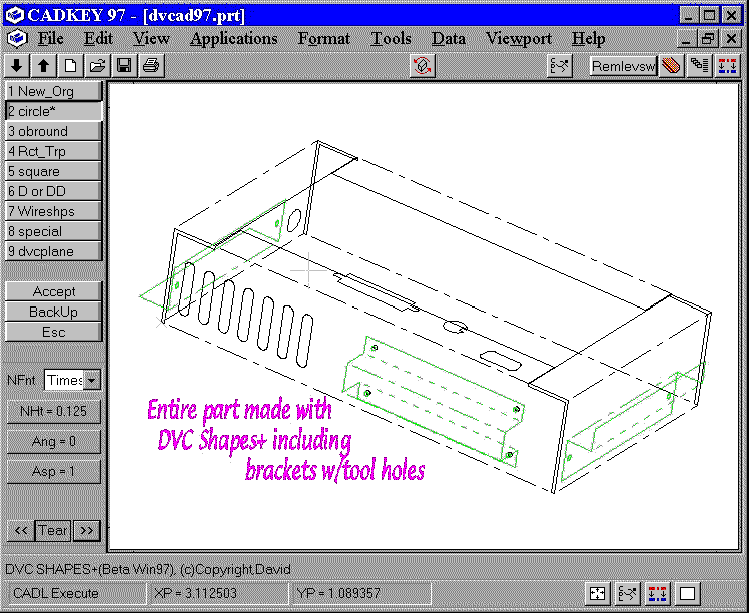
DVC SHAPES+ is a production tool for drawing Sheet metal features and wire models in CADKEY. DVC SHAPES+ works in construction planes and multiple viewports with CADKEY 4.0 thru Cadkey 98. Just pick an origin on your model and start placing shapes while working in view 7 or 8 or any other view. New origin can be chosen anywhere and anytime on your model.
DVC SHAPES+ is written in CADL, compiled, and runs inside CADKEY. It is a menu driven parametric shapes and placement program. A single keystroke can execute the program. The price is a small investment compared with the time that you will be saving.
DVC SHAPES+ will draw rectangles, squares, trapezoids (with or without radius corners), obrounds, circles, single Dee, double Dee, bolt hole patterns, keyholes, and keyways, and more, at any size, or any angle. There is no need to keep patterns of all these common everyday shapes. An origin is selected on a plane and then shapes can be placed by using just X, Y values or incrementally. Last X and Y coordinates used are remembered on the prompt line which saves time from repetitive entry. You don't have to keep grabbing that DELTA from this or that to place your circles or other shapes. Grids and copies are done automatically. Points can be automatically placed on center of drawn shapes on user set level if desired. Material thickness of shapes automatically drawn on user set level if needed.
DVC SHAPES+ can do user defined shapes also. You define your own special shapes one time only. Then use DVC SHAPES+ Placement to place those shapes on your model at any angular orientation in any plane.
DVC SHAPES+ Sheet metal modeling one surface parametric wire models are drawn automatically to dimensions that you input. Many different types and patterns can be drawn. DVC SHAPES+ Sheet metal modeling can also be used for a quick and easy start on more complex models. Add a quick angle or hat section with or with out tooling alignment holes using DVC shapes placement.
DVC SHAPES+ is very easy to use. No training is necessary. Phone support is provided free of charge if needed.
DVC SHAPES+ Will save you TIME!!!!